How It Works
The full scheduling cycle runs in four steps, from the first schedule to an unexpected mid-week absence. Every rule applied, every decision documented.
Rule-based schedule production
Inspect and validate
Finalize and distribute
See everything, act on anything.
01 Generate · Rule-based schedule production
One click, every rule applied.
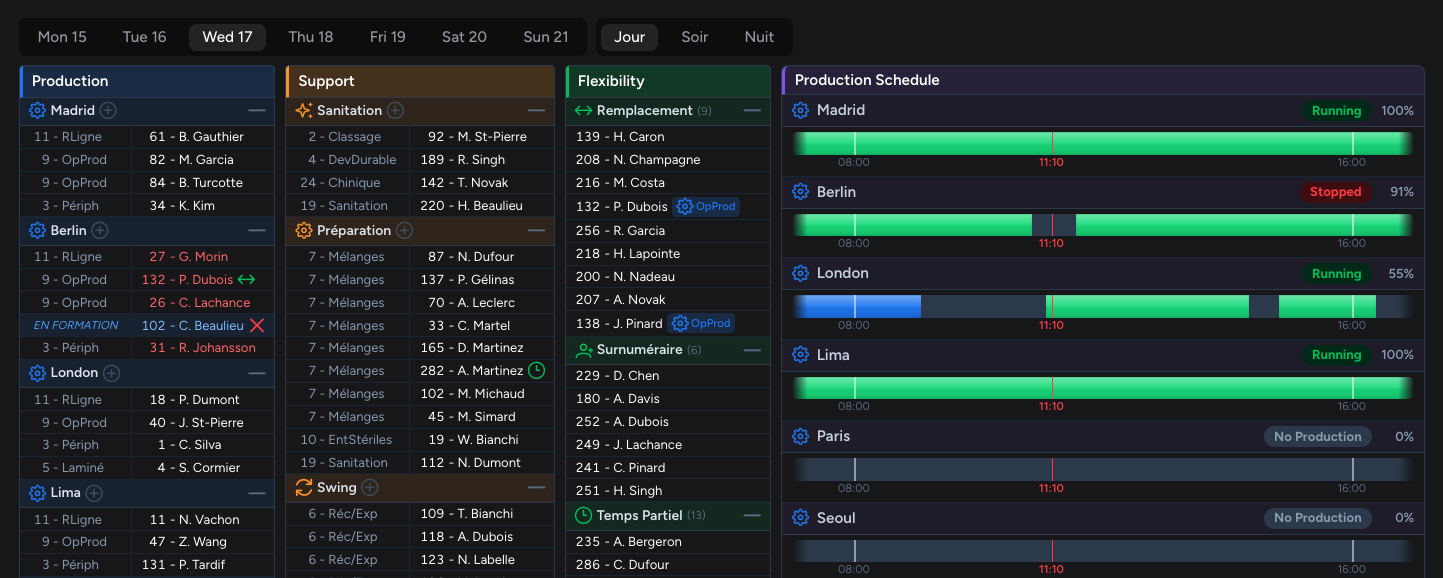
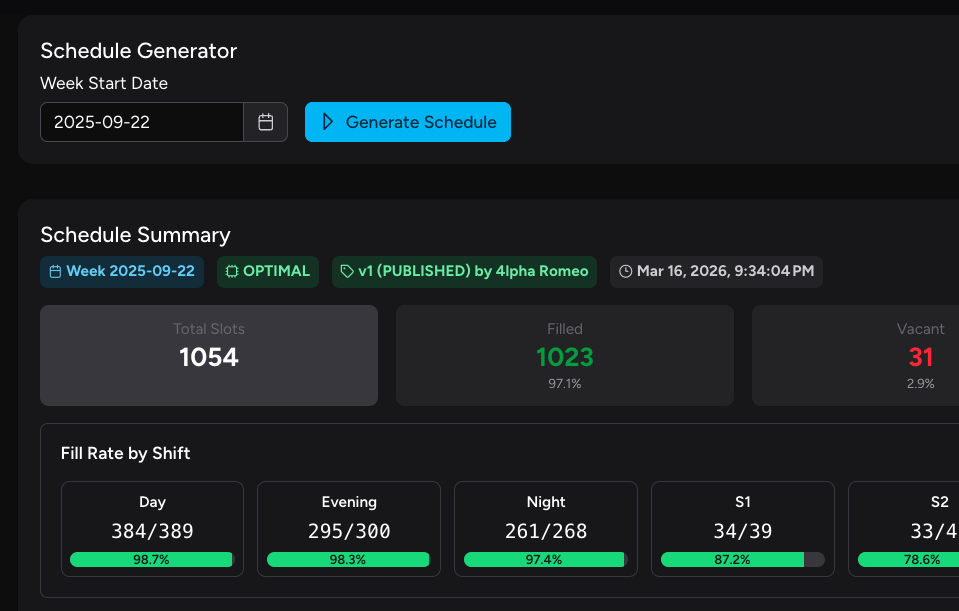
A complete weekly schedule, generated in seconds. The engine walks through every collective agreement clause, every seniority rule, and every skill requirement to find the best fit. The generation screen shows scheduling metrics and flagged vacancies, keeping you in control. Drill into any vacancy to see why no one qualified and what would need to change. That data drives your training plans, hiring, and workforce decisions.
Constraint engine
Seniority, skills, certifications, rest periods, overtime caps, availability. Your entire rulebook, encoded and enforced on every single assignment. Nothing slips through.
Seconds, not hours
What used to take a foreman half a shift is produced while the coffee gets poured. Hundreds of positions across every shift, filled and validated instantly.
Full transparency
Every assignment has a reason. Every exclusion is logged. Ask "why wasn't this person assigned here?" and get a precise, documented answer, not a shrug.
02 Review · Inspect and validate
Trust, but verify.
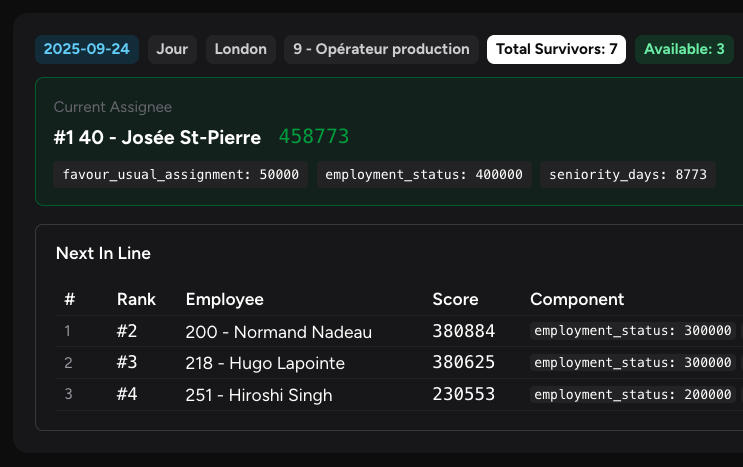
The schedule is generated. Now it's the supervisor's turn. They review assignments, vacancies, and missing links. WFSS surfaces qualified alternatives and rule-compliant swaps, explaining what fits and why. The supervisor adjusts, approves suggestions, and finalizes the schedule. Every tweak improves your data, so the next generation starts from a better place.
Drill into any assignment
Click on any slot and see exactly why that employee was placed there: which rules were satisfied, which alternatives were considered, and why they ranked lower.
Spot exceptions instantly
Unfilled positions, overtime flags, skill mismatches. Surfaced immediately, not buried in a spreadsheet tab no one checks.
Nothing is final until you say so
Override any assignment with a click. Swap employees, reassign positions, lock decisions in place. The system recalculates around your choices. You stay in the driver's seat.
03 Publish · Finalize and distribute
Set it live. Let it breathe.
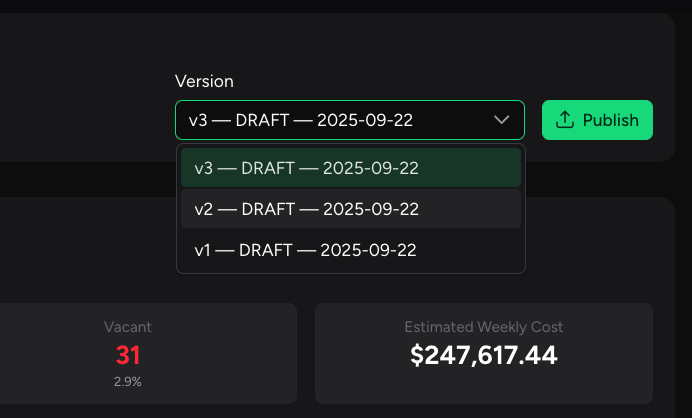
One click locks the schedule and makes it available to everyone. No printouts, no email chains, no version confusion. The published schedule includes occupancy reports and fill rates, giving management a clear picture of where the plant stands. It stays flexible and adapts to your evolving reality: production changes, sick leaves, same-day absences. One source of truth, always up to date.
Version control built in
Every published schedule is stamped, versioned, and archived. Roll back to any previous version if needed. Nothing is ever lost.
Instant visibility
Supervisors see their lines. Employees see their shifts. Everyone works from the same source of truth, updated in real time.
Audit-ready from day one
Who published what, when, and what changed. All logged. When a question comes up, the record speaks for itself.
04 React · See everything, act on anything.
Prepared for the unpredictable.
When the unexpected happens, WFSS does the heavy lifting. Whether it's an unplanned absence, a production change, or a new employee needing training, the supervisor has quick solutions without the extra work. A powerful dashboard offers a broad view of the floor, cross-referencing data, while automated responses fill gaps as they open. More time to walk the floor, less time on the phone. Your team will thank you.
Cascade calling
WFSS works down the replacement list automatically (call, text, or both) in the correct order until someone accepts. No phone marathon, no sticky notes.
Reassign, retrain, adapt
A line stops. A training need comes up. An employee leaves early. WFSS matches displaced or available workers to open positions based on skills and rules, and adjusts coverage around the gap.
Schedule stays stable
One change doesn't cascade into twenty. The replacement slots in, everyone else stays put. No mass reshuffling, no ripple effects, no re-publishing the whole week.
Key Capabilities
Built for the complexity of unionized shift operations.
Modular by design. Pick the capabilities your operation needs, each one configured to your rules, your shifts, your agreement.
Constraint-Based Schedule Generation
Optimized schedules produced in seconds, with every union rule and operational constraint enforced automatically. No manual interpretation required.
Smart Replacement and Cascade Calling
When an absence requires a replacement, WFSS builds a ranked list the supervisor can review and adjust. The tool can then trigger cascade calling or messaging automatically until the position is filled.
Manual Overrides
Any assignment can be overridden with one click. No need to re-run the full schedule. You stay in control of the final output at all times.
Overtime Management
Track, distribute, and cap overtime per union and labor rules. No end-of-cycle surprises. No grievances over unfair distribution.
Workforce Skill Matrix
Map every employee's certifications, qualifications, and skills to every position. The right person, in the right role, every time.
Reporting and Q&A
Fill rates, labour costs, occupancy, and historical trends, all in real time. Ask why any employee was or wasn't assigned to any position and get the documented answer instantly.
Source System Sync
Automatic data refresh from existing ERP, MES, and HR systems. Employee profiles, absences, and production structure stay current without manual entry.
Custom Features
Fully extensible platform. Client-specific rules, workflows, and integrations are built directly into the constraint engine. WFSS adapts to the operation, not the other way around.
Getting Started
The path to go-live.
Every operation is different. WFSS is designed to match yours. We encode your complexity so the software enforces it from day one.
Discovery and Rule Mapping
The WFSS team audits the collective agreement, shift patterns, and existing scheduling workflows. Every rule that currently lives in someone's head gets encoded into the constraint engine.
Data Integration
WFSS connects to existing ERP, MES, and HR systems, building the automated data pipeline that keeps employee profiles, absences, and production structure current without manual input.
Deployment
Installed on your infrastructure: on-prem, cloud, or hybrid. Your data stays in your environment. No exceptions.
Pilot Run
WFSS generates schedules on real data, running in parallel with the existing process. The team validates results before any switchover.
Training
Hands-on sessions with supervisors and foremen. The interface is designed for operational users, not IT. Training is short, adoption is fast.
Go Live and Support
WFSS becomes the primary scheduling tool, with ongoing support, constraint adjustments, and rule updates as the operation evolves.
Continuous Evolution
New features, additional integrations, rule changes, workflow extensions. The platform grows with the operation. Clients define the roadmap.